
← Back to News
NEWS
How to Set Custom Ringtones on iPhone iOS 26
Sep 1, 2025 · Ringtones.com Staff
iPhone's new iOS 26 finally allows owners to set custom ringtones in MP3 format with a few clicks.
All ringtones on Ringtones.com now work for iPhone so long as you're using any model newer than iPhone 11 and have also installed the Apple's iOS 26.
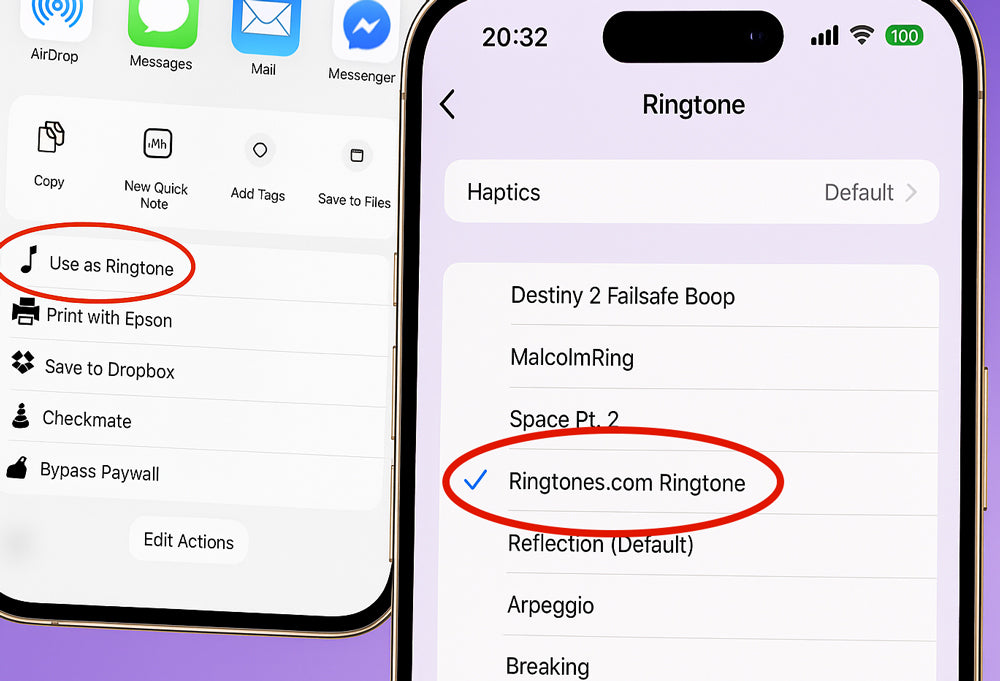
Here's how to install .mp3 files from Ringtones.com as your iPhone ringtone:
- Download the file to your iPhone.
- Open the 'Files' app on your iPhone.
- Long press the MP3 file that you want to set as your ringtone.
- Tap 'Share' in the pop-up menu.
- Scroll down to the actions menu and choose 'Use as Ringtone'
If you have any problems, hit us up at info@ringtones.com